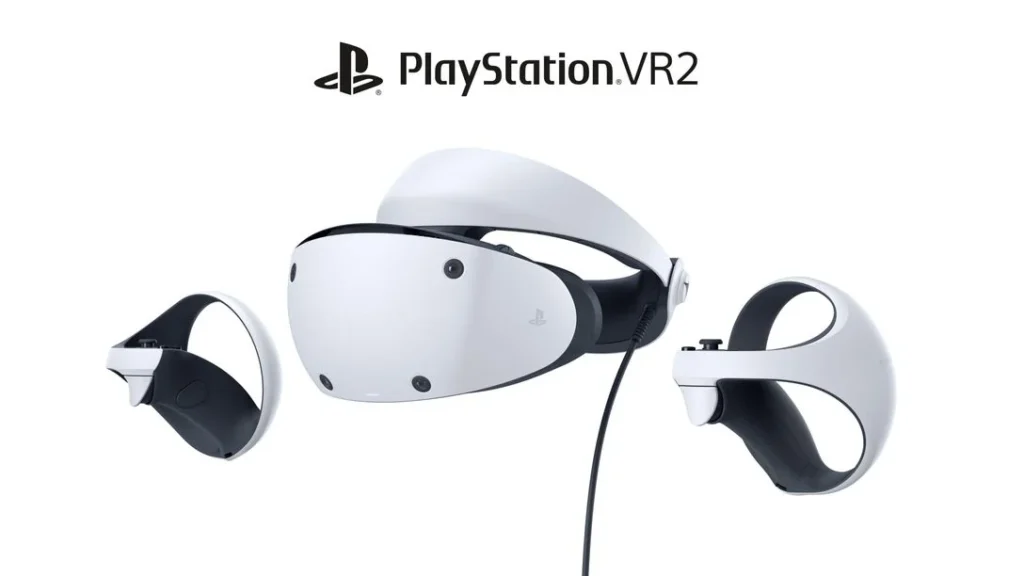
PlayStation VR2 makes the most sense for PS5 owners who can name the games they bought it to play. Between its OLED panels, Sense controllers and direct connection to the console, the experience has a clear purpose. The concern in late 2026 is buying it at a sensible price. Sony set a U.S. suggested price of $399.99 in 2025. In November 2026 the U.S. PlayStation Direct listing had dropped out of the public catalog, with specialist reporting documenting scarce standard retail stock. Treat $399.99 as a price benchmark and check the actual seller against it. Sony’s price announcement · November U.S. availability reporting
Product image from Sony Interactive Entertainment.
Setup and specifications
| Specification | PS VR2 |
|---|---|
| Main host | PlayStation 5 |
| Display | OLED, 2,000 × 2,040 per eye |
| Refresh rates | 90Hz or 120Hz |
| Tracking | On-headset tracking, eye tracking in supported PS5 games |
| Game controls | PS VR2 Sense pair included in standard kits |
| PC path | Windows PC with Sony adapter, suitable DisplayPort cable and Bluetooth |
On PS5, the headset uses a cable to the console. On PC, the separate adapter adds a cable and port checklist. Confirm that the PC has an appropriate native DisplayPort output available and meets Sony’s Bluetooth and USB requirements. A USB-C socket with DisplayPort Alt Mode doesn’t satisfy Sony’s stated PC adapter requirement. Sony technical specifications · Sony PC support · PC adapter listing
What we like
The PS5 experience plays to the hardware. The main attraction is looking around a cockpit in Gran Turismo 7 or playing a compatible PS5 VR title that uses the hardware’s extra features. There’s no wireless video setup to tune. Games can make use of the headset’s tracking, the controllers’ feedback and other features when implemented on PS5. Buy with a specific game in mind, then confirm the exact title and edition. Search results still mix original PS VR software, PS VR2 software and flat-screen releases. Sony’s PS VR2 game catalog
OLED is a real draw for dark scenes. An OLED panel can darken individual pixels, which is useful in nighttime games and scenes with bright highlights against deep shadows. UploadVR’s PC adapter review also describes visible panel grain and Fresnel optical trade-offs. This is a useful reminder that display technology and lens clarity are separate. Pick the kind of image you care about, and try the headset if small text or image uniformity is a deciding factor. UploadVR’s adapter review
What could be better
The PC version gives up features. Sony lists HDR, eye tracking, headset feedback, adaptive triggers and advanced haptics among the differences between PC and PS5 use. You also need the adapter, a suitable DisplayPort cable and compatible Bluetooth for the controllers. If you buy only for a PC, tally those extras before comparing the final cost to a Quest or Pimax. The adapter opens another use for a headset you already own, especially if your desktop meets the requirements. Sony’s PC-versus-console comparison · Sony’s PC adapter listing
A used listing needs more than a quick price check. Make sure there are two working Sense controllers, an intact headset cable, clean and scratch-free lenses, and a return policy that allows a real test on your console. Confirm which bundle contents are included, and assume a used game code might already have been redeemed. For an expensive marketplace listing, compare the seller’s warranty and price to Sony’s baseline before buying. Sony setup and compatibility support
Head to head
A Quest 3 is better for someone who wants standalone games, wireless movement and the option to add PC play. A PS VR2 is the PS5-native choice when console games are the reason to buy. For a Windows-only purchase at an inflated price, compare a Quest 3 for convenience or Pimax Crystal Light for a dedicated wired simulator. Owners who want both PS5 and PC use should make a list of the games they’ll play on each. That tells you whether you actually need the adapter.
Run this check before buying used
Ask the seller to confirm that the headset reaches the PS5 setup screen and pairs with both Sense controllers. Look for clear pictures of the lenses from an angle and the cable near the headset connector. Ask what happens if you find an intermittent tracking or connection problem during a longer play session. You can also check which PS5 games support a seated mode and where you will route the cable. For a cockpit, route it where it can’t cross the wheel, pedals or your path out of the seat. Sony’s setup and safety support
FAQ
Do original PS VR games carry over? Check for a PS VR2 edition or upgrade. Sony does not make the original PS VR library broadly backward-compatible with PS VR2. PlayStation VR2 support
Can I use my racing wheel? Check the wheel against the PS5 and the exact racing game. The headset changes your view inside the game while the wheel still needs its own console and game support.
See PS VR2 hardware and accessories at PlayStation · Compare all the VR headsets
As an Amazon Associate I earn from qualifying purchases.
This review is based on manufacturer specifications, current listings and published hands-on reporting.